
CREATOR PACK — THE hard work
The Ultimate DaVinci Resolve Workflow
Drag & drop animations, cinematic color, viral text, mastered audio...
Watch TO see what's inside!
Most creators waste time before they even start editing
Who is this for?
Expert colorists for broadcast
Fusion and animation specialists
Editors with complex, industry-specific workflows
Editors wanting quick, pro color grades
Creators who need smooth animations
Editors who want good results in a short amount of time
What’s included in the Creator Pack

One click Resolve Project
Your new default setup. Double-click this file every time you start a new video to skip the setup and start creating.

Power Grade
Pro-grade looks for Sony, Canon, Lumix, DJI, and iPhone. Get clean, cinematic colors in a few clicks.

Text Animations
30 clean, ready-to-go viral text animations. No more building titles from scratch—just drag, drop, and type.

Custom Animation Transitions
Drag & drop transitions to animate text, logos, and elements in seconds.
Adjust the length to control speed—no keyframing needed.

Mastered Audio Chain
Pre-set tracks with EQ, compression, Expander, De-esser and noise reduction. Make your voice sound crisp instantly.

Generators & Extras
Animated arrows, circles, scribbles, backgrounds, fonts, shortcuts, and a complete walkthrough tutorial.
TESTIMONIALS
What users are saying...

"The Powergrade alone is already worth the money!!! The text animations looking also super slick, love to use them as hooks! So many things I did manually are now a one click solution. I wish I had something like this years ago."
- Jan Zaslawski
"What I loved most is how well everything is explained. You don't just get the tools, you understand why they're there. I always hated Keyframing and the Animation Transitions in the Pack made this process so easy and fast. NO MORE KEYFRAMES! "
- Robin Poppins

"We have adopted Julian's system fully in our company. All our editors are animating with the transitions from the pack. The amount of time we are saving is insane. Our complete workflow has changed! This Pack is a must for every Editor! Greetings from Switzerland! "
- Dejan Cutkovic

CreatorPack
Your complete DaVinci Resolve editing system
After years of editing, I realized most creators don't need more options, they need better ones. CreatorPack is a collection of the tools I actually use: animations, colors, effects, templates, and workflows that are designed to look great from the moment you drop them into your timeline.
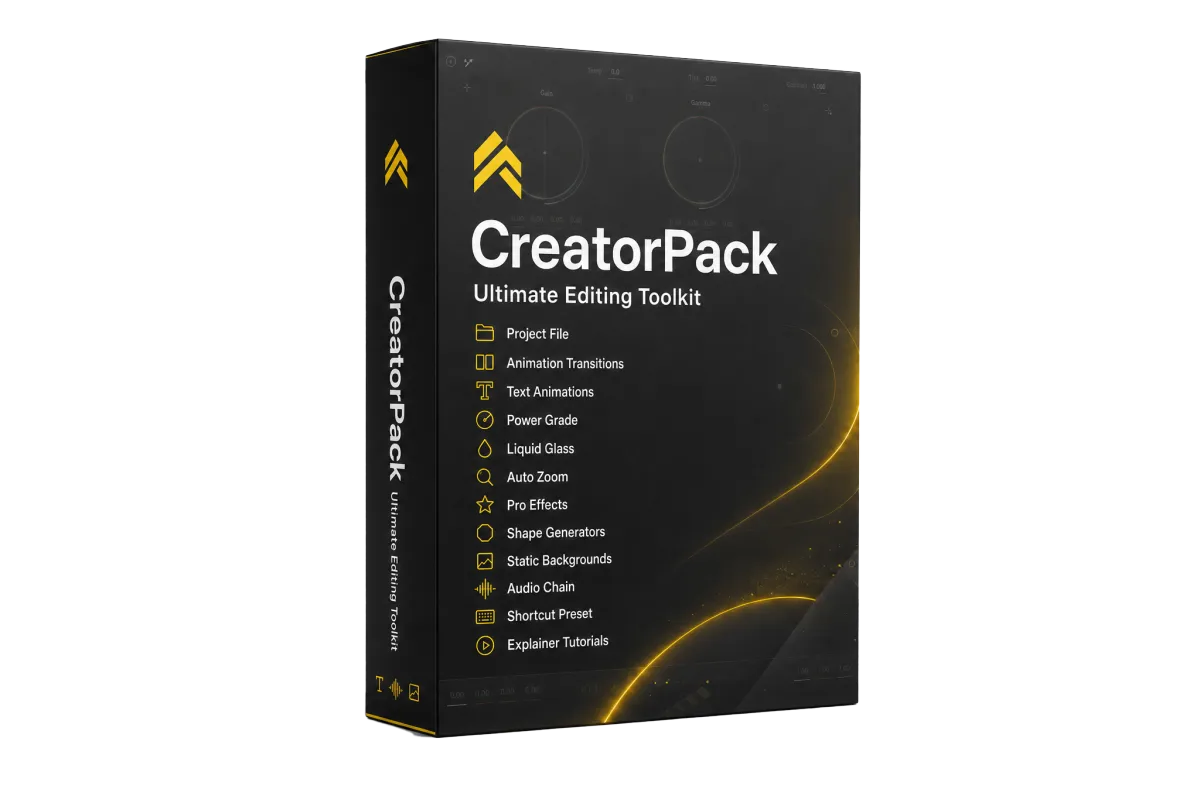
Here's what you get:
Today Just
89€ one time
66 € launch offer
Project File
Animation Toolkit
Powergrade
Viral Text Animations
Drag & Drop Zoom effect
Generators (Arrows, Circle, etc.)
Drag & Drop Glow effect
Drag & drop Camera Shake
Mixed Audio Tracks
Liquid Glass Effect
Keyboard shortcuts preset
Tutorials of the CreatorPack

"Total game-changer."
" Wish I’d found this years ago. "
ABOUT CREATORsergeant
Hi, I'm Julian
I’m an editor and filmmaker obsessed with one thing: removing the friction between an idea and a finished video. I built this pack to share the exact hacks and tools I use to bypass the technical headaches and get straight to a professional result.
Certified DaVinci Resolve Trainer
10+ Years of editing experience
Worked for National TV
Worked for Filmindustry
Over 200K Followers on Social Media
Director of the Show: Creator Battle
The CreatorPack Philosophy...
Most editing packs give you more.
I wanted to give you better.
Every animation is designed to work immediately
Speed is controlled directly on the timeline
A workflow built to skip the setup phase
Tools you'll use on every project
Professional results without the technical headache
Carefully selected instead of endlessly collected
STILL GOT QUESTIONS?
Frequently Asked Questions
Is this pack compatible with DaVinci Resolve Free Version?
Yes! All files are fully compatible with the DaVinci Resolve Free Version. The pack includes step-by-step import instructions and ready-to-use project examples.
Do I need advanced DaVinci Resolve skills?
Not at all. CreatorPack was built for creators who want professional results without spending hours learning every technical detail. Everything comes pre-configured and includes a full walkthrough tutorial.
How exactly do the animations and effects work?
It’s as simple as it gets. You just drag a transition or effect onto your clip, and it’s done. No digging through complex settings or manual keyframing. If you want a movement faster or slower, you simply drag the edge of the transition on your timeline.
I already did the hard work. Now it’s your turn.
© 2026 Creator Pack — All rights reserved. | Terms & Conditions